feedzop-word-mark-logo
searchLogin
Feedzop
homeFor YouUnited StatesUnited States
You
bookmarksYour BookmarkshashtagYour Topics
Trending
trending

Texans upset Kansas City Chiefs

trending

Caitlin Clark declined overseas offer

trending

Taylor Swift at Texans game?

trending

Guilford County schools early dismissal

trending

Walmart Lexington bomb threat

trending

IBM nears Confluent acquisition

trending

Longest solar eclipse in Egypt

trending

Denny's closing underperforming locations

trending

Herbert's hand injury challenges Chargers

Terms of UsePrivacy PolicyAboutJobsPartner With Us

© 2025 Advergame Technologies Pvt. Ltd. ("ATPL"). Gamezop ® & Quizzop ® are registered trademarks of ATPL.

Gamezop is a plug-and-play gaming platform that any app or website can integrate to bring casual gaming for its users. Gamezop also operates Quizzop, a quizzing platform, that digital products can add as a trivia section.

Over 5,000 products from more than 70 countries have integrated Gamezop and Quizzop. These include Amazon, Samsung Internet, Snap, Tata Play, AccuWeather, Paytm, Gulf News, and Branch.

Games and trivia increase user engagement significantly within all kinds of apps and websites, besides opening a new stream of advertising revenue. Gamezop and Quizzop take 30 minutes to integrate and can be used for free: both by the products integrating them and end users

Increase ad revenue and engagement on your app / website with games, quizzes, astrology, and cricket content. Visit: business.gamezop.com

Property Code: 5571

Home / Technology / AirPods Snooze: Auto-Pause Your Audio When You Sleep

AirPods Snooze: Auto-Pause Your Audio When You Sleep

24 Nov

•

Summary

  • New iOS 26 feature pauses audio when AirPods detect sleep.
  • Requires AirPods Pro 2, Pro 3, or AirPods 4.
  • Feature uses accelerometers, not heart rate, for detection.
AirPods Snooze: Auto-Pause Your Audio When You Sleep

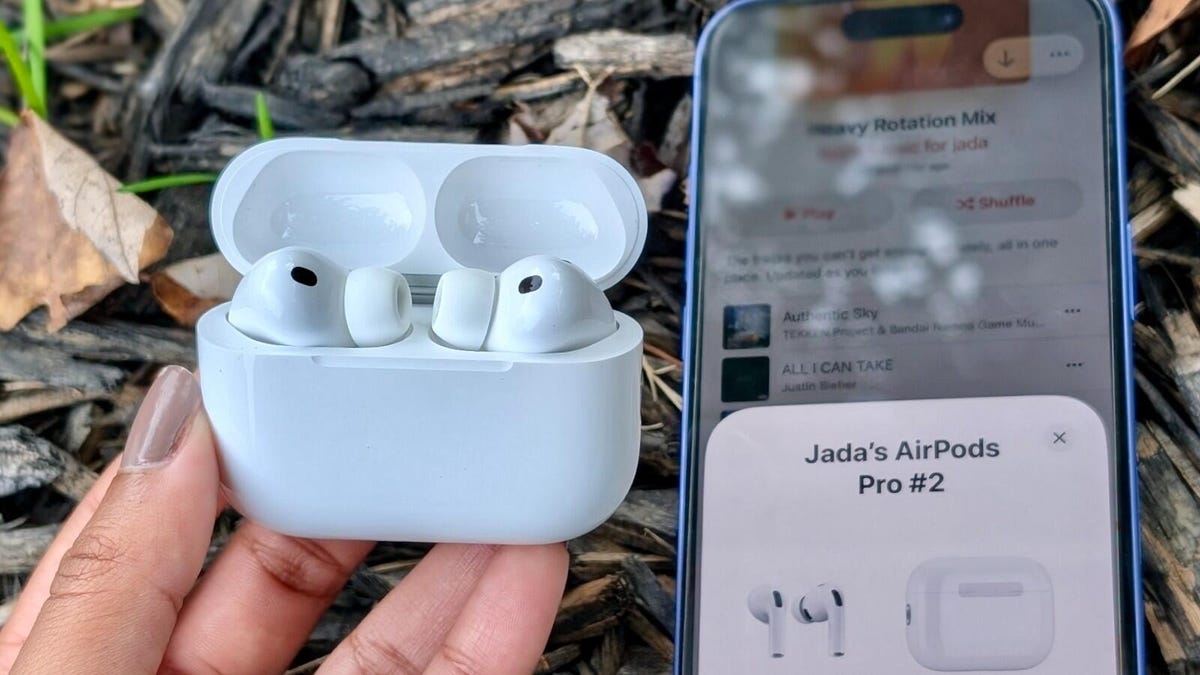
Apple has introduced a new sleep detection capability for specific AirPods models as part of recent iOS 26 updates. This feature, which must be manually enabled in iPhone settings, automatically pauses audio playback when the AirPods detect that the user has fallen asleep. It is compatible with AirPods Pro 2, Pro 3, and AirPods 4.

The sleep detection mechanism relies on the internal accelerometer within the AirPods. This sensor, also responsible for pausing media when earbuds are removed, likely detects a lack of movement indicative of sleep. Unlike the Apple Watch, these AirPods do not passively track heart rate for sleep analysis; this functionality would require initiating a workout in the Fitness app.

Users can activate this feature by navigating to their AirPods settings within their iPhone's settings menu and toggling on "Pause Media When Falling Asleep." Initial testing indicates the feature effectively pauses media a few minutes after sleep onset, enhancing the listening experience for travelers or anyone prone to dozing off.

Disclaimer: This story has been auto-aggregated and auto-summarised by a computer program. This story has not been edited or created by the Feedzop team.
Your AirPods use internal accelerometers, similar to wear detection, to sense a lack of movement indicative of sleep.
The feature is supported on AirPods Pro 2, AirPods Pro 3, and AirPods 4, requiring iOS 26 or later.
No, AirPods Pro 3 do not passively track heart rate for sleep. You must start a workout in the Fitness app for heart rate data.

Read more news on

Technologyside-arrowApple Inc.side-arrow

You may also like

Apple's Open-Ear Earbuds Cancel Noise Without Sealing

6 Dec • 10 reads

article image

AirPods 4 Hit Lowest Price Ever!

1 Dec • 21 reads

article image

Apple's Cyber Sale: Gift Cards Trump Cash Deals?

29 Nov • 38 reads

article image

AirPods Black Friday: Record Low Prices Emerge!

25 Nov • 40 reads

article image

Apple's New AirPods Pro 3 Hit Black Friday Deal!

25 Nov • 49 reads

article image