feedzop-word-mark-logo
searchLogin
Feedzop
homeFor YouIndiaIndia
You
bookmarksYour BookmarkshashtagYour Topics
Trending
trending

Faf du Plessis retires from IPL

trending

Jokic, Davis listed probable tonight

trending

Aequs IPO grey market surges

trending

HDFC Bank stock live updates

trending

Paytm share price rallies

trending

IPL auction: 1355 players register

trending

Hardik Pandya returns to cricket

trending

Bangladesh wins T20I series

trending

AIIMS: effects of sleep deprivation

Terms of UsePrivacy PolicyAboutJobsPartner With Us

© 2025 Advergame Technologies Pvt. Ltd. ("ATPL"). Gamezop ® & Quizzop ® are registered trademarks of ATPL.

Gamezop is a plug-and-play gaming platform that any app or website can integrate to bring casual gaming for its users. Gamezop also operates Quizzop, a quizzing platform, that digital products can add as a trivia section.

Over 5,000 products from more than 70 countries have integrated Gamezop and Quizzop. These include Amazon, Samsung Internet, Snap, Tata Play, AccuWeather, Paytm, Gulf News, and Branch.

Games and trivia increase user engagement significantly within all kinds of apps and websites, besides opening a new stream of advertising revenue. Gamezop and Quizzop take 30 minutes to integrate and can be used for free: both by the products integrating them and end users

Increase ad revenue and engagement on your app / website with games, quizzes, astrology, and cricket content. Visit: business.gamezop.com

Property Code: 5571

Home / Technology / Windows 11 Dark Mode Update: File Explorer Flashes White!

Windows 11 Dark Mode Update: File Explorer Flashes White!

2 Dec

•

Summary

  • Windows 11 update KB5070311 aimed to improve dark mode consistency.
  • Users now experience a white flash when opening File Explorer in dark mode.
  • Microsoft acknowledges the bug and is working on a fix for the issue.
Windows 11 Dark Mode Update: File Explorer Flashes White!

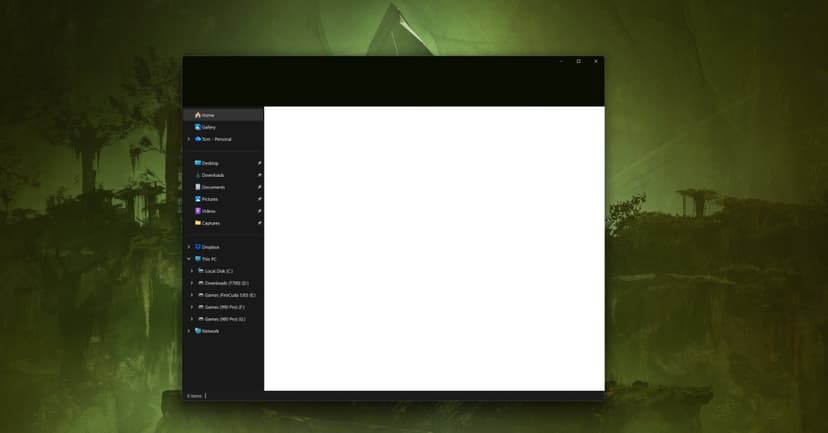
Microsoft's latest Windows 11 update, KB5070311, released yesterday, inadvertently introduced a significant bug impacting the File Explorer's dark mode. While the update aimed to bring a more consistent dark theme, including for dialogs related to file operations, it now causes a bright white flash upon opening the File Explorer window. This unexpected visual disturbance is particularly noticeable for users working in low-light conditions.

Described as a "giant white flash" and a "flash bang" by affected users, the issue presents as a brief blank white screen before files and folders load. Microsoft has officially recognized this problem in the update's known issues section and confirmed that its teams are currently working on a fix to resolve the disruptive white flashing.

Despite the commitment to a unified dark mode experience across Windows 11, this bug slipped through testing. The company plans further dark mode enhancements for the Run dialog, progress bars, and charts views. In the interim, users seeking an immediate solution can explore unofficial Windhawk modifications to restore normal dark mode functionality in File Explorer.


Disclaimer: This story has been auto-aggregated and auto-summarised by a computer program. This story has not been edited or created by the Feedzop team.
A recent Windows 11 update (KB5070311) intended to improve dark mode has caused File Explorer to display a white flash when opened.
Yes, Microsoft has acknowledged the issue and is actively working on a fix for the File Explorer white flash bug.
While waiting for an official fix, you can use a Windhawk mod to restore the normal dark mode appearance in File Explorer.

Read more news on

Technologyside-arrow

You may also like

Windows 11 Login Glitch: Passwords Vanish Post-Update

20 hours ago

article image

Windows Users Flock to Linux: A Digital Exodus

28 Nov • 38 reads

article image

Windows 10 Sticks Around: Millions Shun Win 11 Upgrade

27 Nov • 27 reads

article image

Nvidia Driver Rescues Windows 11 Gamers

24 Nov • 37 reads

article image

Microsoft's Free Lifeline for Windows 10 Users

24 Nov • 26 reads

article image