Home / Technology / USB Port Colors: Decode Your Device's Power!
USB Port Colors: Decode Your Device's Power!
15 Dec, 2025
Summary
- USB port colors indicate device generation and data transfer speeds.
- Even adjacent USB-C ports on the same laptop can have different capabilities.
- Newer laptops may prioritize faster USB-C over USB-A ports entirely.
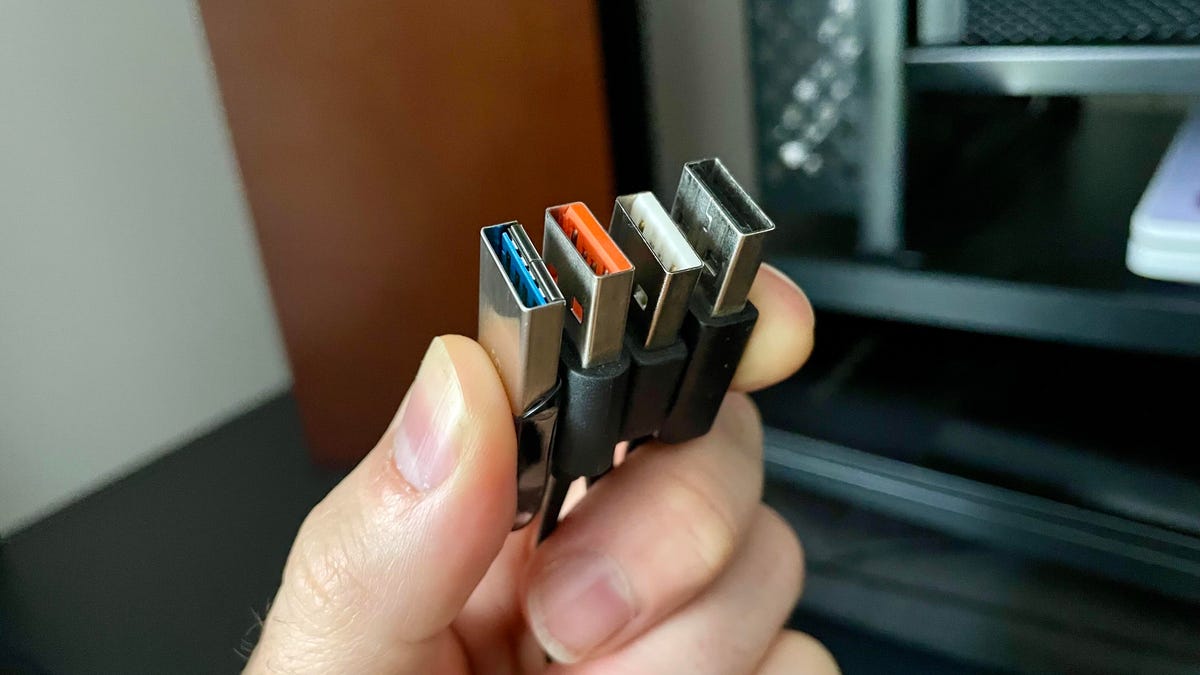
The color of your USB port is more than just an aesthetic choice; it's a coded message about your device's capabilities. Different colors signify the USB generation and the potential data transfer speeds you can expect. This distinction is vital, as even ports located next to each other on the same device can offer vastly different performance levels for data and power transfer.
For USB-A ports, specific colors denote generations like USB 3.0, allowing for higher speeds up to 5 Gbps. While some manufacturers forgo color coding, its presence offers a quick visual cue. Newer laptops are increasingly adopting USB-C, sometimes entirely omitting USB-A, and these ports also feature internal color distinctions for speeds ranging from standard 480 Mbps to advanced 10-20 Gbps.
Beyond standard USB-C, Thunderbolt ports, often marked with a distinct icon, offer even faster speeds up to 40 Gbps. The cutting-edge USB 4 technology pushes speeds up to 120 Gbps, with high-end devices like the MacBook Pro M4 featuring this capability. While these advanced ports are backward compatible, checking your device's specifications sheet is recommended for optimizing performance by matching devices to the appropriate ports.