Home / Technology / Windows 11 Right-Click Menu Finally Customizable
Windows 11 Right-Click Menu Finally Customizable
11 Nov
Summary
- Windows 11 users can now customize right-click menus.
- New Cloud rebuild feature helps recover Windows without USB.
- Update supports Windows 11 25H2 and 26H2; 24H2 support ends.
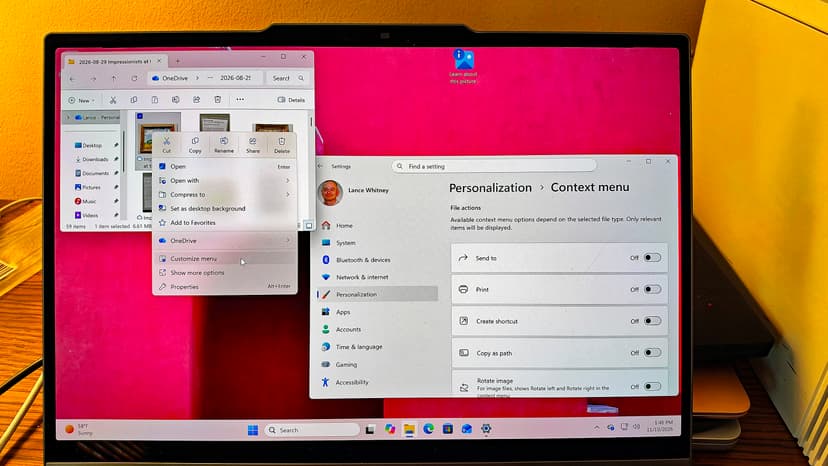
The latest Windows 11 update, rolled out as part of the November Patch Tuesday, introduces a highly anticipated customization feature for the right-click menu. Users can now tailor the menu by adding or removing specific commands and applications, streamlining access to their most-used functions within File Explorer and on the desktop. This addresses a long-standing issue of menu clutter that had become problematic in previous Windows versions.
Beyond menu customization, this mandatory update includes a new Cloud rebuild option. This recovery tool allows users to reinstall Windows 11 using cloud-based system images and drivers downloaded from Windows Update, proving invaluable when the system fails to load and a USB drive or custom image is unavailable. However, this process will not preserve user files.
The update also brings several other enhancements. File Explorer search results will be clearer, Phone Link will preview text in messages upon hover, and the AutoPlay dialog box has been modernized. The Privacy & security settings are now better organized, with improvements also noted for the Taskbar, Magnifier, Narrator, Xbox Mode, and Live Captions. A significant aspect of this release is the resolution of 1,094 security vulnerabilities, including 63 critical flaws and one actively exploited vulnerability in Microsoft Outlook, which could allow a remote attacker to steal login credentials.


